
Build a Real Mobile App Without Writing a Single Line of Code in 14 Days - Glide and Adalo
Quick take
Turn a simple app idea into a working mobile app in 14 days with Glide or Adalo. Learn no-code planning, sheet-based data, testing, and sharing your first app.
Explore this topic
Article body
Build a Real Mobile App Without Writing a Single Line of Code in 14 Days — Glide and Adalo
I had an app idea in Class 11. Nothing fancy — just a simple tracker where my friend group could mark which chapters we'd finished before the boards, so nobody was revising in isolation wondering if everyone else had already covered Organic Chemistry Unit 3. I kept telling myself I'd build it once I learned to code properly. That was two years ago. The app never got built. The boards came and went. And I eventually realised that waiting to "learn to code first" was just a comfortable way of doing nothing.
No-code tools have changed the calculation completely. What I was putting off for two years, I built in a weekend on Glide. Here's the 14-day plan that gets you from app idea to a working link you can share with actual people.
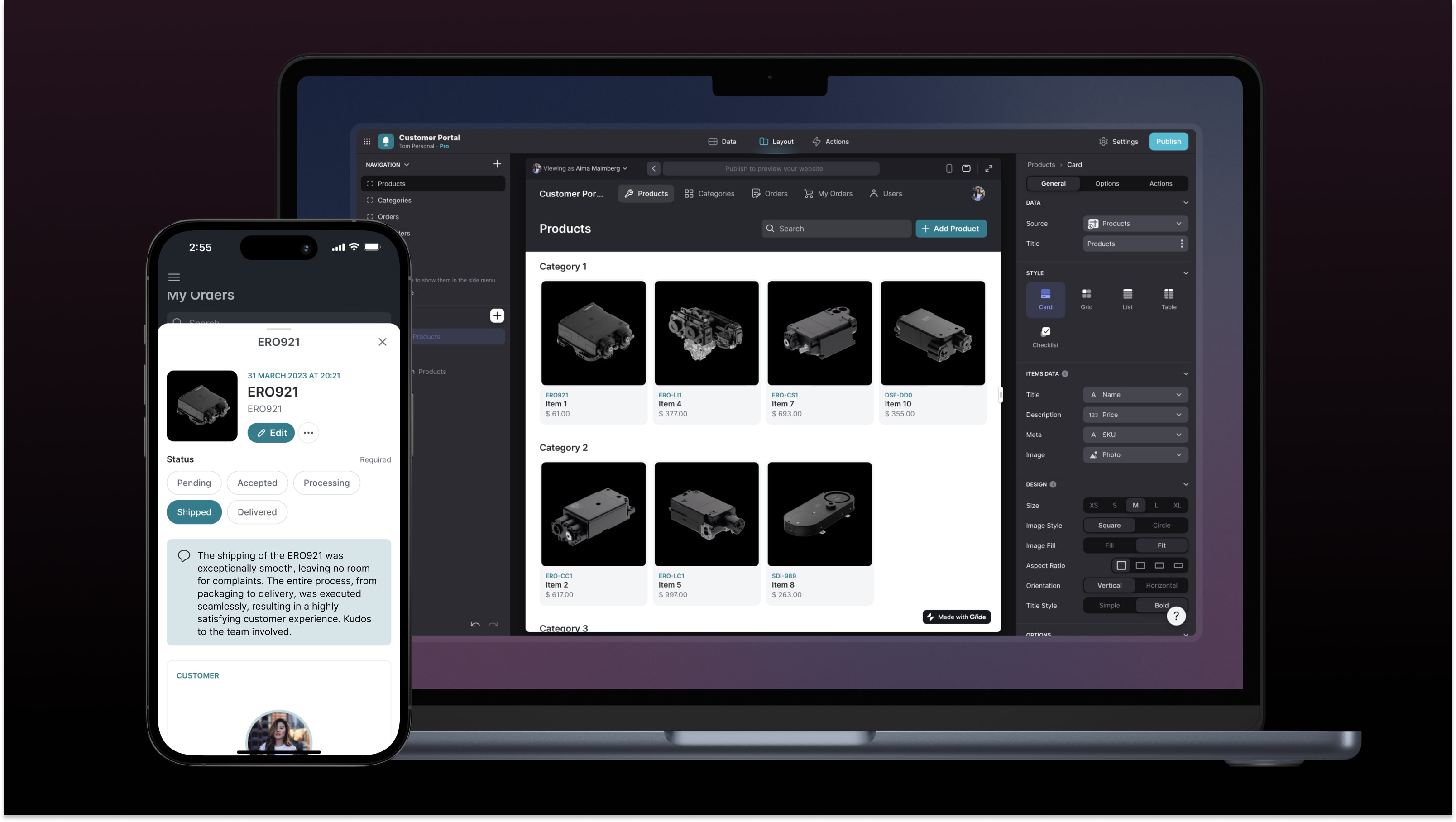
The idea you've been putting off can ship in 14 days without a single line of code.
Day 1: Pick Your Idea — The Right One, Not the Big One
The trap most first-time app builders fall into is picking the most ambitious version of their idea. An idea that needs user accounts, payments, real-time chat, push notifications, and a backend database is not a 14-day no-code project. It's a six-month startup. Save it for later.
For your first app, pick something that solves a problem your immediate group has — five to twenty people, not five thousand. Indian teen life is full of these: the colony cricket team that tracks match scores in a WhatsApp forward nobody can read. The school club that still sends announcements in a PDF. The tuition class where the teacher posts homework in three different places and students check none of them. Any one of these is a legitimate app idea that Glide can handle in 14 days.
Write your idea in one sentence: "An app that lets [who] do [what] so that [why it matters]." If you can't finish that sentence clearly, the idea needs more thinking before it needs building.
Week 1 (Days 2–7): Build in Glide
Glide (glideapps.com) is where you'll spend Week 1. It connects directly to a Google Sheet — which means your app's data lives in a spreadsheet you already know how to use. You drag and drop screens, choose how information is displayed, and your app updates in real time whenever the sheet changes. The free tier allows up to 500 rows of data and unlimited sharing — more than enough for a first app.
Days 2 and 3: set up your Google Sheet. Each column is a field in your app — chapter name, subject, done or not done, who marked it. Columns are your structure. Think of them before you touch Glide. Then sign in to Glide with your Google account and connect the sheet. In about ten minutes you'll have a functioning app that looks like an app.
Days 4 and 5: customise the layout. Glide gives you List, Card, Tile, and Detail views for displaying your data. Pick the one that fits your content. Add a detail screen so tapping on an item shows more information. Add a button — a checkbox, a toggle, a form — that lets users add or update entries. This is where your app starts feeling interactive rather than just informational.
Days 6 and 7: add your visual identity. Change the app name and icon. Pick a colour that isn't the default blue. Add a tab bar if your app has more than one section. Send yourself the preview link and open it on your phone. You now have a real app on your phone's home screen that you built.
Glide vs Adalo — which one?
Glide — Best for data-display apps: directories, trackers, catalogues, noticeboard apps. Built on Google Sheets so you edit data in a spreadsheet. Free tier is generous. Start here.
Adalo (adalo.com) — Better for apps with user accounts, sign-in screens, and more complex interactions like messaging or bookings. Steeper learning curve. Free tier has branding on the app. Try this for your second app.
Honest note: Glide's free tier adds a small "Made with Glide" badge. For a personal project or school use, this doesn't matter. If you're showing it to a real client someday, the paid plan starts at $25/month — but that's a problem for future-you.
Week 2 (Days 8–14): Test, Improve, and Ship
Day 8 is your internal testing day. Use the app yourself for a full day. Open it on your phone the way a real user would — not the way a builder who knows all its shortcuts would. What's confusing? What takes too many taps? What doesn't make sense to someone who didn't build it? Write down every friction point. Fix the biggest three on Day 9.
Days 10 and 11: share the app with three to five people. Not your most supportive friends — the ones who will tell you what's actually broken. In India, find the one cousin who immediately presses buttons to see what breaks. That person is worth more than ten people who say "nice app yaar." Ask them to use it for a real task, watch them do it without helping, and note every moment they pause or get confused.
Days 12 and 13: fix what the feedback revealed. Not all of it — prioritise the one or two things that came up repeatedly. The goal isn't a perfect app. The goal is a working app that does its one job reliably. Anything beyond that is polish you can add in Version 2.
Day 14: share it. Post the link to your WhatsApp group, your school Discord, your Instagram story. Frame it honestly — "I built this in two weeks, try it and tell me what you think." You will get feedback that feels harsh. That feedback is the first sign that real people are using a thing you made, which is genuinely more than most people ever do.
Quick Tips
- Start with the Google Sheet, not the Glide interface — the sheet is your database. Get its structure right first and the app builds itself almost automatically.
- Five users giving real feedback beat fifty users who never open it — share with a small, specific group, not a mass blast on Day 1.
- Your first app is not your best app — it's just proof that you can finish something. The second one will be built faster and with better judgment.
- Free ideas for Indian teens: colony event board, class timetable + homework tracker, study group chapter tracker, school club announcement app, cricket team score tracker, tuition class attendance log.
- When you hit something Glide can't do — write it down as a feature for Version 2. Don't pivot to a different tool mid-build. Finish first, upgrade later.
Open glideapps.com and write your one-sentence idea.
That's all Day 1 asks. The Google Sheet goes up on Day 2. By Day 7 you have a working app on your phone. The idea you've been delaying because you "don't know how to code" can be live in the time it takes to finish one Netflix series.
You don't need to learn to code to build something real. You just need to start.Comments 0
Keep reading
Similar blogs by topic

Open Source: The Free Thing That Runs the Entire Internet
Your phone, the servers that sent you this page, and every supercomputer on earth run on software volunteers wrote and gave away. Here's how that happened, why it's fragile, and why it's the one industry that will let a sixteen-year-old touch real infrastructure.

I Asked ChatGPT to Do My Internship Search. Here's What It Got Wrong.
It gave me five perfect-sounding internships in ten seconds. Three didn't exist. Here's what AI is actually good for in a job search, and the one part it cannot do for you.

Goku Isn't Talented. That's the Whole Point.
Goku loses constantly, and every time the show cuts to him training. We remember the Super Saiyan moment and delete the montage that earned it — and we do the exact same thing to ourselves.